You're mid-match, mid-download, or mid-login, and suddenly nothing works. The first question everyone asks is the same one: is XBOX down right now, or is it just me? The honest answer is that it's almost always more useful to check than to guess, because "just restart your router" and "wait three hours for Microsoft to fix a server" require completely different responses, and confusing the two wastes your evening.
Here's how to actually check whether XBOX is down right now, what the different types of outages mean, and what to do while you wait it out.
How to Check If XBOX Is Down Right Now
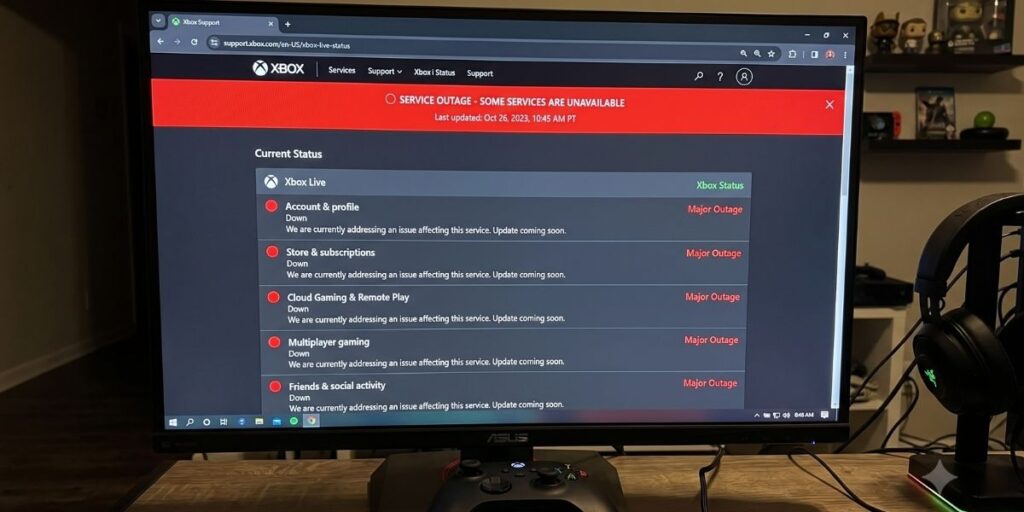
The official source: XBOX Status Page. Microsoft maintains a live status dashboard at xbox.com/live/status that breaks down service health by category: sign-in, cloud gaming, multiplayer, purchase and content usage, and more. Green means operational, yellow means limited or intermittent issues, red means the service is down. This is the single most reliable way to confirm whether XBOX is down right now versus a problem specific to your setup, because it's coming directly from Microsoft rather than crowd-sourced guesswork.
Third-party outage trackers. Sites like Downdetector aggregate user reports in real time and show a spike graph when large numbers of players report problems simultaneously. These aren't official, but a sudden vertical spike is a strong signal that something is genuinely down rather than a problem isolated to your console. Cross-reference this against the official status page for confirmation.
Social media, specifically X and the XBOX Support account. Microsoft's support account posts acknowledgments of major outages, often faster than the status page updates. Searching "XBOX down" on X during a suspected outage usually surfaces real-time reports from other players experiencing the same issue, which is often the fastest confirmation that XBOX is down right now rather than a problem on your end.
What XBOX Outages Usually Mean
Not all outages are the same, and understanding the category helps you predict how long it'll last:
Sign-in and authentication issues are the most common and usually the shortest, typically resolving within an hour as Microsoft's authentication servers recover from a traffic spike or a backend update gone wrong. If you can't sign in, this is the likely culprit.
Multiplayer and matchmaking outages affect online play specifically while single-player and downloads continue working normally. These often coincide with major game launches (a new Call of Duty season, a Game Pass day-one drop) overwhelming server capacity.
Store and purchase outages prevent buying games or redeeming codes but rarely affect gameplay for games you already own. Lower urgency, usually resolved within a few hours.
Full platform outages affecting sign-in, multiplayer, and store simultaneously are rare and usually tied to a significant infrastructure problem. These take longer to resolve, sometimes stretching several hours, and Microsoft typically posts regular updates on the status page as they diagnose the root cause.
Is It XBOX or Is It You? Quick Troubleshooting
Before assuming the whole platform is down, rule out the simpler explanations:
Restart your console. A full power cycle (hold the XBOX button for 10 seconds, unplug for 30 seconds, restart) fixes a surprising number of connectivity issues that look like server problems but are actually local caching or network handshake failures.
Check your internet connection separately. Try loading a website or streaming service on the same network. If everything else works except XBOX, the problem is more likely on Microsoft's end. If nothing works, the problem is your internet, not XBOX being down right now.
Check your NAT type. In Network Settings, a Strict or Moderate NAT type can cause multiplayer connection issues that mimic a server outage. Open NAT is ideal, and adjusting router settings (UPnP, port forwarding) can resolve this on your end without waiting for Microsoft.
Test on a different network if possible. Mobile hotspot as a quick diagnostic: if XBOX works over cellular data but not your home WiFi, the outage is local, not something Microsoft needs to fix.
What to Do While You Wait
If you've confirmed XBOX is down right now and it's genuinely a Microsoft-side issue:
Switch to single-player. Most outages affect online services specifically. Your existing game library and single-player campaigns typically remain playable even during sign-in or multiplayer outages.
Check downloads and installs. Some outages don't affect background downloads at all, so a good outage-waiting strategy is starting a large Game Pass download and letting it run while the servers recover.
Follow official channels for updates. Rather than repeatedly refreshing the status page, following the XBOX Support account gives you a passive way to know the moment service is restored.
Save your bug reports if something seems broken beyond the outage. If issues persist after the status page shows all-green, it may be an isolated account issue rather than a platform outage, and Microsoft's support team will want the specifics if you end up filing a ticket.
The Takeaway
Is XBOX down right now? Check the official status page first, cross-reference with Downdetector or social media if you want a faster read, and rule out your own network before assuming the worst. Most outages resolve within an hour, sign-in issues are the most common and shortest-lived, and full platform outages are rare enough that when they happen, you'll know because everyone online is talking about it.
The controller isn't broken. The internet isn't broken. Sometimes it's just Tuesday, and Microsoft's servers are having a moment. Check the status page, grab a snack, and it'll probably be back before you finish it.

AKA VoltHound. Leads Game Pass coverage, hardware reviews, and cross-platform comparisons. Reviews built on mechanics and value over story (the opposite of Micah, which is why they work). Has uninstalled a game mid-cutscene. Twice. Will do it again.Leads Game Pass coverage, hardware reviews, and cross-platform comparisons. Reviews built on mechanics and value over story (the opposite of Micah, which is why they work). Has uninstalled a game mid-cutscene. Twice. Will do it again. Learn More About Nico